
Racing Master
Exptional GlobalRacing
4.41.15K Reviews
- Version
- 0.31.0
- Installs
- 500.00K
- Age Rating
- Everyone 10+
Screenshots
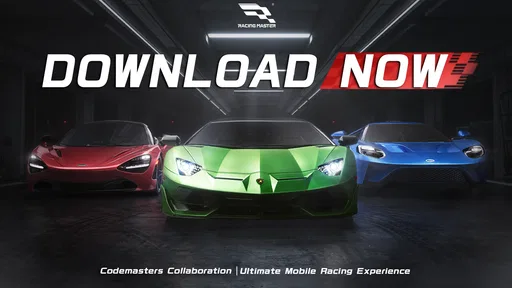
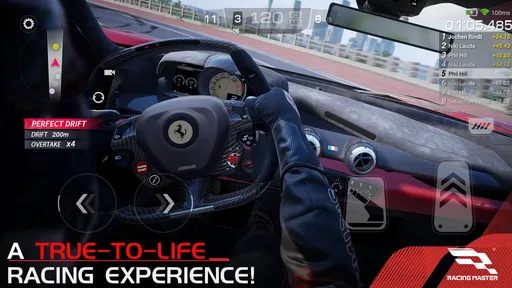
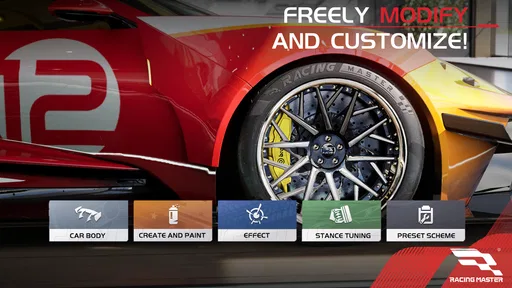

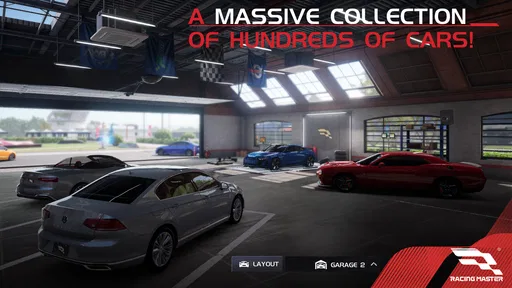
Our Review of Racing Master
 Analysis by Appyee
I went into Racing Master expecting a quick mobile racer and came away with something that feels more demanding than its free download suggests. It is a racing game from Exptional Global, aimed at players who want a more serious driving experience on Android or iOS rather than a purely casual game that can be understood in a few seconds. The basic appeal is easy to grasp: choose a car, get onto the track, and work on driving cleanly. The real question is whether you are willing to spend time getting comfortable with its controls and presentation.
My first impression was that this is best approached as a game you learn gradually. The store summary presents it as a mobile racing experience made with Codemasters®, but that short description does not tell you how much the quality of a session depends on your own setup. Screen controls, camera preference, device performance, connection stability, and your tolerance for repeated practice all matter. I would not install it expecting every race to feel effortless from the first launch.
Getting comfortable before the first serious race
The first place many players are likely to get stuck is not the racing itself, but the transition from downloading the game to actually enjoying it. A free game can still require patience during its initial setup, and a visually ambitious racer is particularly sensitive to storage space, background activity, and an unstable connection. I recommend closing other demanding apps before starting, keeping the device charged, and allowing the game to finish its own preparation instead of repeatedly switching away from it.
That small routine makes a practical difference. If the opening experience feels slow or inconsistent, it is tempting to blame the game immediately. In my experience, mobile racing is unusually affected by heat and multitasking. A phone that is already warm from video, navigation, or another game may reduce performance once a longer race begins. Starting with a cool device gives you a much fairer impression of how the game handles.
The minimum operating-system requirement is Android 5.0, which makes the compatibility statement broad, but that should not be confused with identical performance across every phone. Older hardware may technically run the game while offering a less comfortable experience than a newer device. The current version is 0.31.0, so I would also check that the installed build is current before spending time troubleshooting unusual behavior. Updates can change stability, controls, or the way a particular device behaves.
Controls are a personal setup decision
Touch steering is convenient, but it is not automatically the best choice for every player. I found that the difference between a pleasant race and a frustrating one can come down to how much screen movement is needed for a turn. If the steering response feels too sensitive, make smaller movements rather than constantly correcting from one side to the other. Oversteering is especially costly when you are trying to learn a circuit.
If the game offers several control approaches on your device, test them in low-pressure races before judging the handling. A player who normally prefers tilt controls may find them uncomfortable in a crowded room or while commuting. Someone who likes direct touch buttons may appreciate their predictability but dislike the way they occupy screen space. There is no universal winner here; the useful choice is the one that lets you make the same input consistently.
Camera position deserves similar attention. A view that looks impressive can make braking points harder to judge, while a closer perspective may improve precision but reduce your sense of what is happening around the car. I suggest changing one setting at a time and driving the same type of race after each change. That creates a simple comparison instead of leaving you unsure whether the problem came from the camera, steering, or your own timing.
What to check when a race feels wrong
Before deciding that the handling is broken, separate three different problems: input delay, unstable performance, and unfamiliar physics. Input delay makes the car react after your finger or movement; unstable performance makes the picture or response fluctuate; unfamiliar physics feels consistent but different from another racing game. Each calls for a different response.
For input delay, remove anything that may be competing for attention on the device and avoid playing while the phone is under heavy load. For unstable performance, try a shorter session after the device has cooled down. For unfamiliar handling, repeat the same corners and focus on smoother inputs. This distinction is one of the most useful habits I developed with the game because it prevents me from changing every setting at once.
The best early adjustment is usually consistency, not speed. I would rather complete several clean laps with a manageable control setup than chase a fast time while making emergency corrections everywhere. Once the car responds predictably, you can begin refining braking and corner exits. That approach also helps reveal whether the game suits you: if you enjoy learning a demanding driving style, the effort becomes part of the appeal; if you only want instant arcade action, it may feel like unnecessary work.
Recovering a session when something goes wrong
Mobile games are often played in imperfect situations. A call interrupts the race, the phone changes network, the device becomes hot, or the app closes unexpectedly. When that happens, I recommend restarting in stages rather than immediately reinstalling. First return to the game, allow it a moment to settle, and check whether the problem repeats. If the issue remains, fully close the app, reopen it, and try a short session before committing to a longer event.
This staged approach matters because reinstalling is disruptive and does not solve every cause of trouble. It can also make you repeat setup steps without learning whether the original problem was temporary. A restart is more informative when you change only one condition. For example, if a race stuttered while several other apps were open, close those apps and try again. If the same behavior appears on a cool device with little else running, you have stronger evidence that the issue deserves further attention.
Connection problems should be treated separately from control problems. If menus, loading, or online-related activity behave inconsistently, test the game on a stable connection and avoid moving between networks during a session. If the car itself feels difficult to control while the rest of the game responds normally, changing networks is unlikely to improve your driving. Keeping those symptoms separate saves time and stops you from making random changes.
I also recommend making a habit of finishing one short test before entering a longer race. Use it to confirm that steering, sound, display response, and general performance feel normal. This is particularly useful after an update or after playing in a different location. It is a simple workflow, but it protects your time: discovering a problem in a brief test is much less annoying than finding it halfway through a serious attempt.
Spending needs a deliberate approach
The game is free to download, but it includes in-app purchases ranging from $0.49 to $99.99 per item. That wide range is worth keeping in mind before you begin. I would decide in advance whether I am playing strictly without spending or whether I am comfortable making occasional purchases. Setting that boundary early reduces the chance of treating a moment of frustration as a reason to buy something immediately.
For a new player, I would first learn the driving and progression rhythm without paying. That gives you a better idea of whether the game’s core racing is enjoyable on its own. If you later decide to spend, do it because a purchase supports the way you already play, not because you are trying to skip an experience you have not yet evaluated. This is especially important for anyone who prefers a predictable entertainment budget.
Parents should also pay attention to the Everyone 10+ content rating and the presence of purchases. The age label makes the game broadly accessible, but accessibility does not remove the need for sensible device and account settings. I would treat the purchase range as a reason to review those settings before handing the phone to a younger player.
When the phone or network is the real problem
Not every rough session is caused by the game. A weak signal, aggressive battery-saving behavior, limited free storage, a crowded background workload, or a device that is already overheating can all make a demanding racer feel unreliable. The quickest way to narrow this down is to compare conditions: play briefly after a restart, with a stable connection, and without other intensive apps running. If the experience improves clearly, the original problem was probably environmental rather than a permanent fault in the game.
It is also worth checking whether the trouble appears everywhere or only in one part of the experience. If a particular menu behaves strangely but driving remains smooth, that points to a different issue from a race that consistently loses responsiveness. I avoid changing several system settings at once because it makes the result impossible to interpret. One careful test is more useful than a long list of guesses.
Players using older phones should be realistic about the trade-off. The broad minimum OS requirement may allow installation, but a comfortable racing experience still depends on hardware and thermal behavior. If you notice worsening performance during longer sessions, shorter play periods and a cooler device may help. If the game remains uncomfortable even after those basic checks, a lighter racing game may be a better match for that phone.
How it fits into a real daily routine
I can see myself using this game in two very different ways. On a quiet evening, I would play with enough time to adjust controls, repeat a difficult section, and focus on improving rather than simply finishing. That is where the game’s more serious character makes sense. It rewards attention, and the act of gradually becoming smoother can be satisfying for anyone who enjoys racing as a skill rather than a brief distraction.
On a busy day, I would be more selective. If I had only a few minutes between errands, I would avoid starting a race that requires concentration and a stable connection. A sudden interruption can turn a promising attempt into wasted time. For short breaks, I would use the game only when I knew I could give it an uninterrupted window. That is a practical limitation, but it is also honest advice for commuters, students, and anyone who frequently plays while multitasking.
Compared with a simple arcade racer, Racing Master feels like the better choice when you want driving to matter. Arcade alternatives are often easier to pick up, more forgiving, and better suited to quick bursts. Compared with a highly specialized simulator, this game is likely to be more approachable on a phone, but touch controls still cannot reproduce the physical confidence of a wheel and pedals. I would choose it as a middle ground: more involved than a disposable racer, less demanding in equipment than a dedicated simulation setup.
That middle position will not satisfy everyone. If your priority is instant acceleration, exaggerated effects, and minimal learning, an arcade game may deliver more enjoyment with less effort. If your priority is deep hardware control and the most precise possible input, a console or computer simulator is a stronger option. This game makes the most sense for mobile players who want a serious racing flavor while accepting the compromises of a touchscreen.
Who should give it a fair chance
I would recommend it to players who enjoy repeating a track to improve their line, adjusting controls until they feel natural, and treating a clean finish as a meaningful achievement. It is also a good candidate for someone who has outgrown very simple mobile racers but does not want to carry a separate gaming device. The audience size suggests that the game has attracted substantial interest, with more than 500 thousand installs and an average rating of 4.4 from about 12 thousand ratings.
Those figures are encouraging, but they should not replace your own judgment. A rating cannot tell you whether the touch response feels right in your hands, and install volume cannot guarantee that your particular phone will perform comfortably. I see them as signs that the game is worth testing, not as proof that every player will enjoy it.
I would be cautious about recommending it to someone who dislikes repetition, becomes frustrated by technical setup, or wants every session to work perfectly on an older device. I would also steer away players who are uncomfortable with optional purchases unless they are prepared to keep a firm boundary. The game can be free to start, but the surrounding choices still require attention.
My practical verdict after testing the workflow
What I like most is the sense that this is trying to make mobile racing feel substantial rather than disposable. Exptional Global has positioned it for people who want more than a few exaggerated turns, and the Codemasters® connection in the store summary reinforces that intended direction. The strongest experience comes when you prepare the device, settle on controls, and give yourself enough time to learn instead of judging the game during a rushed first race.
What holds it back is the amount of friction surrounding that experience. Device condition, heat, connection quality, and control preference can all influence whether a session feels polished. The free entry point is welcome, but the purchase range means I would approach the game with a clear spending plan. None of these points automatically disqualifies it, yet they make it less universal than a lightweight arcade racer.
My recommendation is straightforward: try it if you want a mobile racing game with a more serious rhythm and you are willing to tune your setup. Start with short tests, learn whether your phone stays comfortable during play, and judge the controls after several consistent attempts rather than one bad corner. If you want instant, low-commitment fun, choose a simpler alternative. For me, this is a worthwhile free racer when approached patiently, but it is not the kind of game I would install expecting zero adjustment or zero friction.
Verdict
Strengths of Racing Master
- Highly detailed car models and realistic driving physics
- Large selection of licensed cars from well-known manufacturers
- Multiple race modes, events, and competitive online challenges
- Extensive tuning options for performance and visual customization
- Supports immersive controls with steering, buttons, and motion input
Limitations of Racing Master
- Requires considerable storage space and frequent content downloads
- High-end graphics can drain battery and heat some devices
- Online features depend on a stable internet connection
- Progression may feel slow without regular play or optional purchases
- Controls and menus can take time to master on smaller screens
Other Releases by Exptional Global
View All
Once Human
Adventure4.6

Where Winds Meet
Action4.2

Star Hunter-Infinite Lagrange
Strategy3.7

Destiny: Rising
Action4.2
Similar Picks in This Category
View All
Hill Climb Racing
Fingersoft4.3

Dr. Driving
SUD Inc.4.2

Traffic Rider
skgames4.5

Asphalt 8 - Car Racing Game
Gameloft SE4.6

Race Master 3D: Car Racing
Beresnev Games4.6

Extreme Car Driving Simulator
AxesInMotion Racing4.3
Frequently Asked Questions
What is Racing Master, and what kind of racing experience does it offer?
Racing Master is a realistic mobile racing game focused on licensed cars, detailed tracks, and competitive driving. It combines simulation-style handling with accessible controls, allowing you to race using touch controls or other supported input options. The game emphasizes car collection, upgrades, customization, and online competition, so it is aimed at players who enjoy a more authentic driving experience rather than a simple arcade racer.
Can Racing Master be played offline, or does it require an internet connection?
Racing Master is primarily designed as an online game and generally requires a stable internet connection to access its main features. Online connectivity is used for account services, multiplayer races, events, progression, and downloading game resources. Players should not expect a complete offline experience. A reliable Wi-Fi or mobile data connection is recommended, especially during competitive races, because interruptions may affect loading, matchmaking, or race performance.
Is Racing Master free to download, and does it include in-app purchases?
Racing Master can generally be downloaded for free, but it includes optional in-app purchases. These may provide premium currency, vehicle-related items, customization resources, progression advantages, or limited-time content. Spending money is not always necessary to try the game or enjoy its basic racing features, although players who want to collect cars quickly or progress faster may encounter purchase offers. Parents should review device purchase settings before allowing children to play.
What devices and performance level are recommended for Racing Master?
Because Racing Master features detailed vehicles, realistic environments, online races, and demanding visual effects, it performs best on a relatively modern Android or iOS device with sufficient storage and memory. Older or entry-level phones may experience longer loading times, reduced graphics quality, frame-rate drops, or overheating. Before downloading, it is worth checking the current store requirements and ensuring that enough free storage is available for the initial installation and later updates.
Does Racing Master support multiplayer and competitive racing?
Yes, multiplayer competition is one of Racing Master's main attractions. Players can race against other users through online modes, events, and matchmaking-based competitions, depending on the version and content currently available. Success depends not only on car performance but also on braking, cornering, racing lines, and connection stability. New players may face experienced opponents, so spending time practicing controls and learning each track is helpful before entering more competitive races.
Play our best games!


